
Introduction
Greetings - and welcome to part two of a temporary diversion from the CD-ROM Software - the attempt of my daughter and me to create our own home pages on the Internet.
Neither of us have any knowledge of HTML programming and, although I am a partner in EdREv an Internet based educational software review service, I rely entirely on Lis Shelley for the programming side of it.
The original intention was that I would create a home page for O'Connor Christian School, and then that I would help Naomi create her own home page. However, November has been an extremely busy period for my consultancy business, so I left it to her to get on with it. Naomi has her own computer (an Aptiva 133Mhz Pentium) and has been busily using the Internet for school projects and for chatlines for the past 6 months, as she is probably already more proficient at navigating the Net than I am. I am pleased to be able to report that we are collecting her login details for her own Internet Project account, so now I might be able to start spending some serious time on the Net again!
Naomi duly set off with her own page and, with the help of the tutorials that we down loaded from the Corel home page on the Internet, she soon became thoroughly familiar with Web Designer and Web Gallery and, to a lesser extent, Web Draw and Web Move. See her notes following.
As I explained in the last article, the Corel Web Graphics suite has 6 components:
 Web Designer- Internet authoring without any knowledge of HTML programming language
Web Transit- publishing of existing documents to the Web
Web Gallery- a library of over 7500 Internet-ready clip-art images
Web Move- creation of animations for Web pages
Web World- turning a Web site into an interactive virtual reality
Web Draw- create and edit illustrations via CorelDRAW technology
Within a couple of weeks Naomi created a home page and loaded it onto PCUG Home User's Home Page on the Internet. It is illustrated in Diagram 1, and you can find it at www.pcug.org.au/~thomnick/.
As well as some text information, the page contains a variety of clip-art, fancy headings, internal and external hyperlinks and (most impressively) a disclaimer. All of this was created in Web Designer. That component allows you to type and format your text, add headings, line breaks and clip-art and, most importantly, add hyperlinks. The latter are the secret of net navigation, and they come in two types: internal ones that allow you to move quickly from one part of your home page to another, and external ones that provide a direct link to other pages on the net. In the illustration below, Chatphiles is an illustration of an external link - if you click on this word, which is in a different colour to the rest of the text, 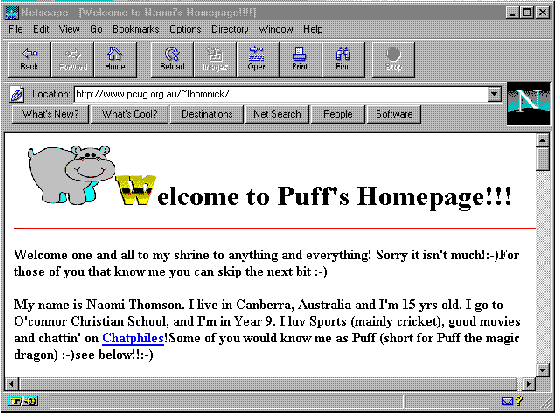 then you are taken directly to X Files Chatting Forum, one of Naomi's favourite chatlines (a place where you can engage in 'real time' conversations with other users on the Net). Further down there are links to a number of other sites like cricket and Calvin and Hobbes. To save users from having to continually scroll up and down the page, Naomi has added a few internal links - so just below what is visible in Diagram 1 there are links to Lots o' Links, About me and E-mail me. The latter calls up a Send Mail/Post News dialog box. Within Web Designer the creation of this feature is easy.
One of the things that most of us want to do is add clip-art to our home pages, and this is where WebDraw comes in. It is a scaled down version of Corel Draw, and it is illustrated in Diagram 2.
The screen layout and the tools are familiar to anyone who has used Corel Draw 5, 6 or 7, and you can use it to create your own artistic masterpieces, or (my preferred option) to add clip-art. WebDraw allows you to import clip-art in just about any format (including from the extensive library that comes with Corel Draw 5 onwards), and then publish it in JPEG or GIF formats, so that you can then add it directly to your home page. Additionally, it allows you to interlace GIF files. You can also add hyperlinks and hot spots to the images, and then re-size the images without losing their hotspot location references.
then you are taken directly to X Files Chatting Forum, one of Naomi's favourite chatlines (a place where you can engage in 'real time' conversations with other users on the Net). Further down there are links to a number of other sites like cricket and Calvin and Hobbes. To save users from having to continually scroll up and down the page, Naomi has added a few internal links - so just below what is visible in Diagram 1 there are links to Lots o' Links, About me and E-mail me. The latter calls up a Send Mail/Post News dialog box. Within Web Designer the creation of this feature is easy.
One of the things that most of us want to do is add clip-art to our home pages, and this is where WebDraw comes in. It is a scaled down version of Corel Draw, and it is illustrated in Diagram 2.
The screen layout and the tools are familiar to anyone who has used Corel Draw 5, 6 or 7, and you can use it to create your own artistic masterpieces, or (my preferred option) to add clip-art. WebDraw allows you to import clip-art in just about any format (including from the extensive library that comes with Corel Draw 5 onwards), and then publish it in JPEG or GIF formats, so that you can then add it directly to your home page. Additionally, it allows you to interlace GIF files. You can also add hyperlinks and hot spots to the images, and then re-size the images without losing their hotspot location references.
We have experimented with WebMove, the animation component, by working through the tutorial on disk. The process operates by means 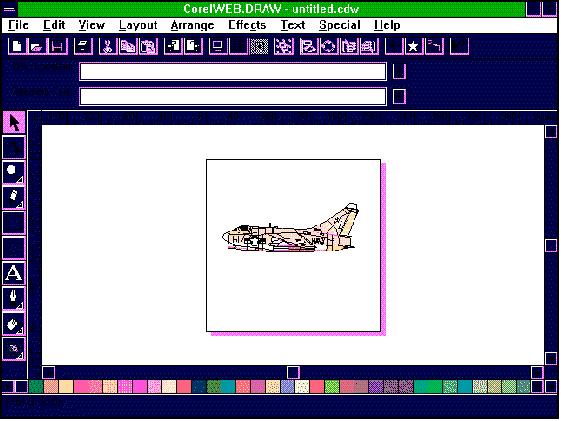 of a series of frames, into which you place 'actors', cells (different shots of the 'actor') and props. It is quite easy to do, and we plan to add some sort of animation to the home page at some point.
The process of loading the home page up onto the Users Group page on the Net took a little while, and it was quite complicated ( or at least it seemed so to us novices), but Naomi managed it with the help of:
An article in Jan 1996 Sixteen Bits called Recipe for Home Made Home Pages by Nhan Tran
Some advice from Lis Shelley
A utility called NetTerm
All in all, the process has been surprisingly easy, and now I will get back onto the school home page. Web Graphics is a package that I recommend most highly for anyone out there who is interested in creating home pages on the Net - whether personal, public info or commercial. All the features you need are there - including the ability (via Web Transit) to take an existing document and put it on the Net. Given the complexity of the package and the variety of features, $369 is great value for money. My only grizzle, as I mentioned in the last article, is that the tutorials have to be downloaded from the Net - they are not supplied on disk with the product.
Naomi's Notes
This month I review Web Graphics by Corel.
The main feature that I used was Web Design; however, I also looked briefly at Web Move.
Web Design is basically an easy and effective way of creating an attractive homepage for the Internet, whether it's personal or for a small business. I found all the features very easy to use, and I had my own homepage completed extremely quickly. A tutorial is available; however, it must be downloaded from the Net which is a bit annoying, but the tutorial gives very good, easy and clear instruction as to how you go about creating a homepage. It helps you design guestbooks, hyperlinks, bookmarks and contains a big variety of clip-art that you can add to your page.
Web Move is another feature of Web Graphics which helps you to design and run an animation with your choice of background, actors and props. I didn't use any animations in my Webpage, but I found creating them was reasonably simple, using the tutorial under the help menu as a guide.
Web Graphics makes it very easy to create interesting, attractive and creative net pages, and if you are looking into setting up your own homepage I'd recommend this product and I give it a 5/5 rating. It was easy to use, clear and comes up with some great results.
I haven't personally really looked into Web Transit or Web Move, but Web Design is brilliant and worth taking a good look at.
Happy home paging, thanx for reading.
Australian Distributors
Dataflow Tel (02) 9417 9700
Fax (02) 9417 9797
Online http://www.dataflow.com.au
Tech Pacific Australia
Tel (02) 9697 8552 Fax (02) 9697 8593
Australian RRP $369.00
System Requirements
486 or higher running Windows 3.1/Windows 95/Windows NT, 8Mb of RAM , about 30Mb of Hard disk, CD-ROM, VGA display, mouse.
 Back to Index